TL;DR
You have CI/CD for your frontend, backend, and infrastructure. But your vector database updates are still manual upserts with no rollback plan. This article introduces Vector Ops: treating your Pinecone index like a deployment target, not a database you poke directly.
Every production system has a deployment pipeline. Your React app goes through lint, test, build, and deploy stages. Your API has staging environments and blue-green deployments. Your Terraform changes go through plan and apply with approval gates.
Then there's your vector database. How do you update it? If you're like most teams, the answer is: someone runs a script that calls upsert() directly against production. Maybe there's a Jupyter notebook involved. Maybe it's a cron job that nobody remembers setting up.
This is the “upsert and pray” pattern, and it's why your Pinecone index keeps breaking.
The Cost of Manual Vector Updates
When something goes wrong with a code deployment, you check the diff, identify the bad commit, and roll back. When something goes wrong with your vector index, you have none of that. Questions you can't answer:
- What vectors were added or removed in the last update?
- Which version of the embedding model produced these vectors?
- Can we restore yesterday's index state?
- Did someone manually modify the index outside the pipeline?
If you can't answer these questions, you don't have observability. You have a black box that sometimes returns wrong answers.
What is Vector Ops?
Vector Ops applies the same principles that made DevOps successful to AI data pipelines:
The core idea: your vector database is a deployment target, not a source of truth. The source of truth is your versioned dataset. Syncing to Pinecone is like deploying to production.

The Staging Index Pattern
Before deploying code to production, you test it in staging. The same principle applies to vector data. Instead of pushing new embeddings directly to your production index, push them to a staging index first.
How It Works
- 1. Create a new dataset version with your updated embeddings
- 2. Sync to a staging index (separate Pinecone namespace or index)
- 3. Run validation queries against staging
- 4. Promote to production if validation passes
- 5. Keep the old version for instant rollback
# Push new embeddings to staging$ dcp sync push my-dataset pinecone-staging --version 5⠋ Computing diff v4 → v5...+1,200 added, -50 deleted, ~300 updated✓ Sync complete. Staging index updated.# Run validation (your own script)$ python validate_retrieval.py --index staging✓ 95/100 canary queries passed# Promote to production$ dcp sync push my-dataset pinecone-prod --version 5✓ Production sync complete.
The staging index pattern catches embedding drift, model mismatches, and data quality issues before they hit production. It's the same reason you don't deploy untested code.
Version your embeddings, detect drift automatically, and roll back in seconds. Start free with 5GB storage.
Automating with GitHub Actions
Manual syncs are better than direct upserts, but the real power comes from automation. Here's a GitHub Action that syncs your dataset to Pinecone on every merge to main:
# .github/workflows/sync-vectors.yml
name: Sync Vectors to Pinecone

on:
  push:
    branches: [main]
    paths:
      - 'embeddings/**'

jobs:
  sync:
    runs-on: ubuntu-latest
    steps:
      - uses: actions/checkout@v4

      - name: Install Decompressed CLI
        run: pip install decompressed-cli

      - name: Sync to Staging
        env:
          DECOMPRESSED_API_KEY: ${{ secrets.DECOMPRESSED_API_KEY }}
        run: |
          dcp sync push my-dataset pinecone-staging

      - name: Validate Staging
        run: python scripts/validate_retrieval.py --index staging

      - name: Sync to Production
        if: success()
        env:
          DECOMPRESSED_API_KEY: ${{ secrets.DECOMPRESSED_API_KEY }}
        run: |
          dcp sync push my-dataset pinecone-prod
Now your vector updates follow the same workflow as code: commit, push, automated tests, deploy. If validation fails, the production sync never happens.
Adding Rollback on Failure
What if production sync succeeds but you discover issues later? Add a rollback step:
      - name: Rollback on Failure
        if: failure()
        env:
          DECOMPRESSED_API_KEY: ${{ secrets.DECOMPRESSED_API_KEY }}
        run: |
          # Get the previous version number
          PREV_VERSION=$(dcp dataset versions my-dataset --limit 2 | tail -1 | awk '{print $1}')
          dcp sync push my-dataset pinecone-prod --version $PREV_VERSION --mode full
Control Planes vs. File Versioning
Some teams try to solve this with file versioning: store embeddings in S3 with version prefixes, write scripts to load and upsert. This works for small datasets but breaks down at scale.
The File Versioning Approach
- Store
embeddings_v1.parquet,embeddings_v2.parquetin S3 - Write a script that loads the file and calls
upsert() - Rollback means re-running the script with an older file
Why It Breaks
- Full re-upload on every change: Even if you changed 10 vectors, you re-upload millions
- No incremental sync: Can't compute what actually changed between versions
- No drift detection: If someone modifies Pinecone directly, you won't know
- No atomic operations: Partial failures leave the index in an inconsistent state
File versioning treats your index as a cache to be rebuilt. A control plane treats it as a deployment target with state to be managed.
The Control Plane Approach
A control plane like Decompressed sits between your embedding pipeline and your vector database. It tracks:
- What version is deployed to each destination
- What changed between versions (adds, deletes, updates)
- Whether the destination drifted from the expected state
- Full history of every sync operation
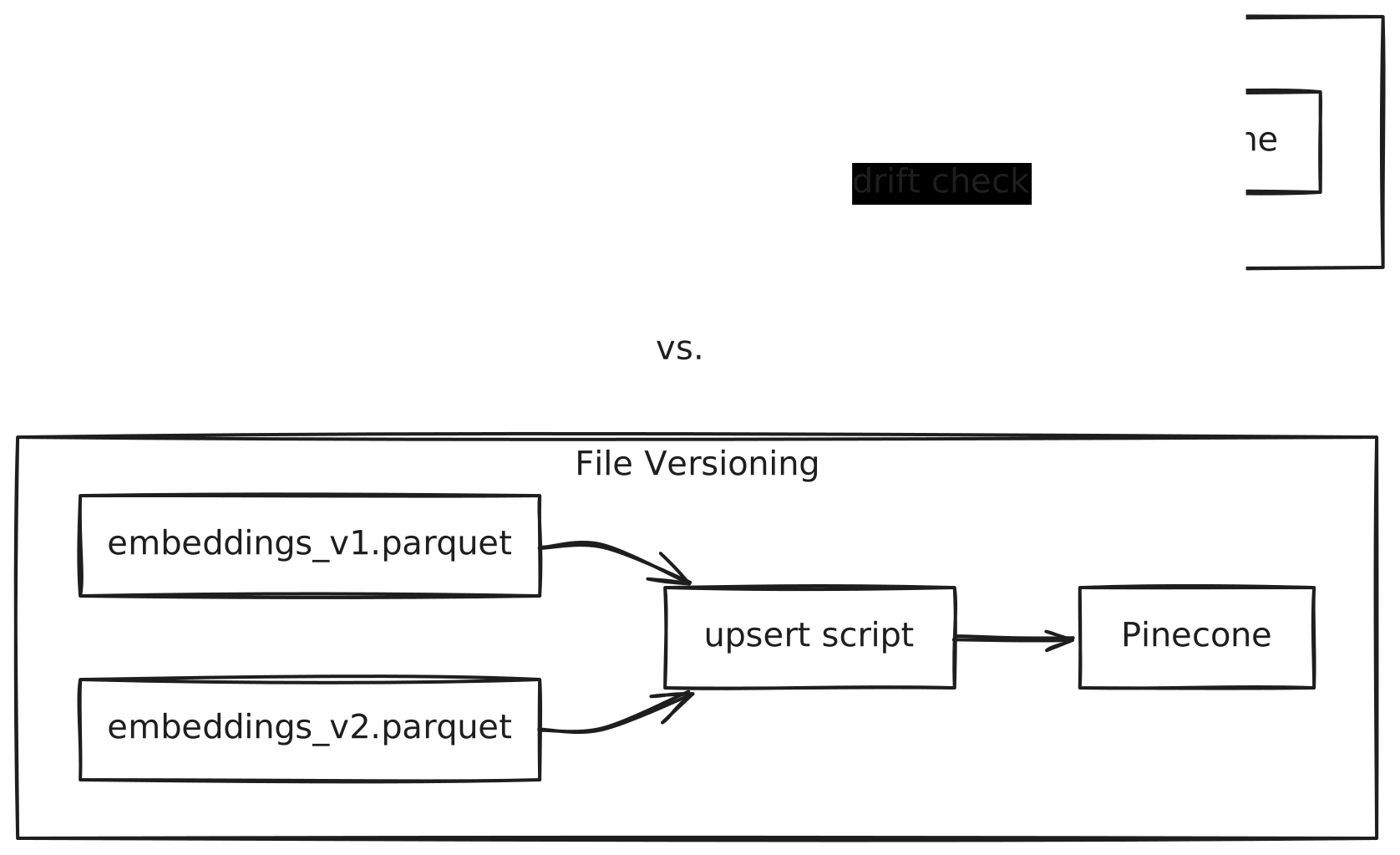
With this architecture, syncing a new version only pushes the diff. Rolling back is instant because old versions still exist. Drift detection catches unauthorized changes before they cause problems.
Detecting Drift
Drift happens when your vector database gets modified outside your pipeline. Maybe someone ran a manual delete. Maybe another service is upserting vectors. Maybe a failed sync left partial data.
Before every sync, Decompressed performs a drift check:
$ dcp sync push my-dataset pinecone-prod⠋ Checking for drift...⚠ WARNING: Drift detected in destinationExpected: 50,000 vectorsFound: 49,847 vectors153 vectors missing from destinationProceed anyway? [y/N]
This warning tells you that something modified your index outside the pipeline. You can investigate before proceeding, or force the sync to restore the expected state.
The Migration Path
Moving from manual upserts to Vector Ops doesn't require a big-bang migration. Here's a gradual approach:
The Checklist
Before your next vector update, make sure you can answer yes to these:
The gap between “hobbyist RAG script” and “enterprise AI system” isn't model quality or prompt engineering. It's operational maturity. The same practices that made software deployments reliable, versioning, staging, automation, rollback, apply directly to vector data.
Your Pinecone index isn't a database you poke directly. It's a deployment target. Treat it like one.